Introduction
Every day, millions of people open their email inbox without thinking twice. Some emails are from banks, some from shopping websites, and some from work. Most look normal. But hidden among genuine emails are dangerous traps called phishing emails.
One wrong click can:
- Steal your passwords
- Empty your bank account
- Hack your social media
- Lock your files with ransomware
- Leak personal information
And the scary part?
Many phishing emails look completely real. Even smart people, company employees, and experienced internet users fall for them daily.
Cybercriminals are no longer sending badly written fake messages with obvious spelling mistakes. Modern phishing attacks are professional, emotionally manipulative, and highly convincing.
To understand how online protection works, read our complete guide on What Is Cyber Security?.
You can also learn how modern technology protects systems in our article: What Is AI Security?.
If you use:
- Mobile banking
- Social media
- Online shopping
- UPI apps
- Office tools
What Are Phishing Emails?
A phishing email is a fake email created by cybercriminals to trick people into revealing sensitive information. Usually, attackers pretend to be trusted companies, banks, government agencies, or popular online services.
Their goal is simple:
- Steal login credentials
- Access banking information
- Install malware
- Hack accounts
- Commit financial fraud
Phishing emails are a form of social engineering attack, where hackers manipulate human emotions instead of directly attacking software systems.
Popular brands often impersonated include:
- Microsoft
- Amazon
- PayPal
- Netflix
Why Are Phishing Emails So Dangerous?
Imagine this.
You receive an email saying:
“Your bank account has been temporarily suspended. Verify immediately to avoid permanent closure.”
You panic.
Without checking carefully, you click the link and enter your login details.
Within minutes:
- Your bank account is compromised
- OTPs are intercepted
- Money disappears
This happens because phishing attacks target human psychology.
Hackers use:
- Fear
- Urgency
- Curiosity
- Excitement
- Trust
Instead of breaking into systems technically, they convince users to open the door themselves. That’s why phishing remains one of the most successful cyberattack methods worldwide.
How Phishing Emails Work
Let’s understand the phishing process step by step.
Step 1: Creating a Fake Identity
Hackers copy:
- Company logos
- Email templates
- Brand colors
- Fonts
- Official-looking language
Step 2: Triggering Emotion
The email usually creates:
- Panic
- Urgency
- Excitement
Examples:
- “Your account will be blocked.”
- “Suspicious login detected.”
- “Claim your reward now.”
- “Payment failed.”
Emotional reactions reduce logical thinking.
Step 3: Redirecting Victims
The email contains:
- Fake login links
- Malicious attachments
- Fraudulent payment pages
These pages look nearly identical to real websites.
Step 4: Stealing Information
Once users enter details:
- Passwords get stolen
- Banking credentials are captured
- Devices may get infected
Sometimes malware installs silently in the background.
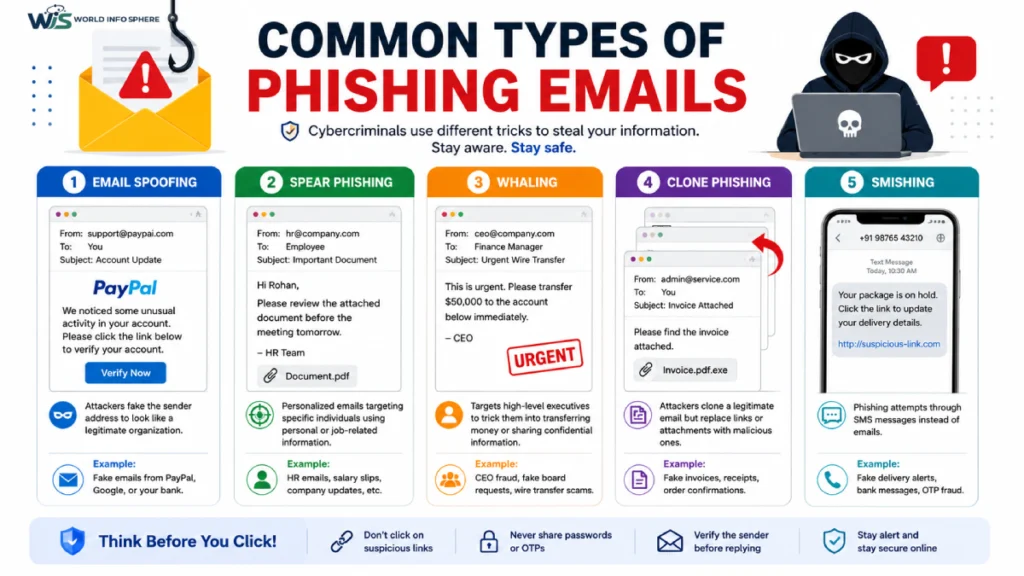
Common Types of Phishing Emails
1. Banking Phishing Emails
Attackers pretend to be banks.
Examples:
- KYC update alerts
- Suspicious transaction notifications
- Debit card verification requests
These are very common in India because people frequently use online banking and UPI apps.
2. Login Verification Scams
You may receive fake alerts from:
Example:
“Someone tried accessing your account. Verify immediately.”
3. Job Offer Phishing
Many freshers in India fall for fake recruitment emails.
Hackers promise:
- High salary jobs
- Work-from-home opportunities
- Government jobs
Then they ask for:
- Registration fees
- Personal documents
- Banking details
4. Delivery & Courier Scams
Fake messages pretending to be:
- Courier companies
- E-commerce delivery services
Example:
“Your parcel delivery failed. Update address here.”
5. Business Email Compromise (BEC)
This targets companies.
Hackers impersonate:
- CEOs
- HR teams
- Finance departments
Employees unknowingly transfer money or share confidential data.
Real-Life Example of a Phishing Attack
A college student from Ahmedabad received an email appearing to be from Netflix.
The email claimed: “Your subscription payment failed. Update card details.”
The website looked completely genuine.
He entered:
- Card number
- CVV
- OTP
Within 15 minutes, thousands of rupees were deducted from his account.
Later he realized:
- The URL was fake
- The email sender was suspicious
- The page was not secure
One small mistake caused major financial loss. This is exactly how phishing works.
Why People Fall for Phishing Emails
1. Emails Look Professional
Modern phishing emails are highly polished.
Some are better designed than real company emails.
2. Mobile Users Don’t Check Properly
On smartphones:
- URLs appear shortened
- Email addresses are hidden
- Security warnings are less visible
People click faster on mobile devices.
3. Fear Creates Panic
Attackers intentionally create pressure:
- “Act now”
- “Immediate action required”
- “Account suspension warning”
Panic reduces attention.
4. People Are Busy
- Office workers often skim emails quickly while multitasking.
- Hackers exploit this habit.
5. Personalized Attacks
Hackers gather information from:
- Social media
- LinkedIn profiles
- Public websites
This creates highly believable emails.
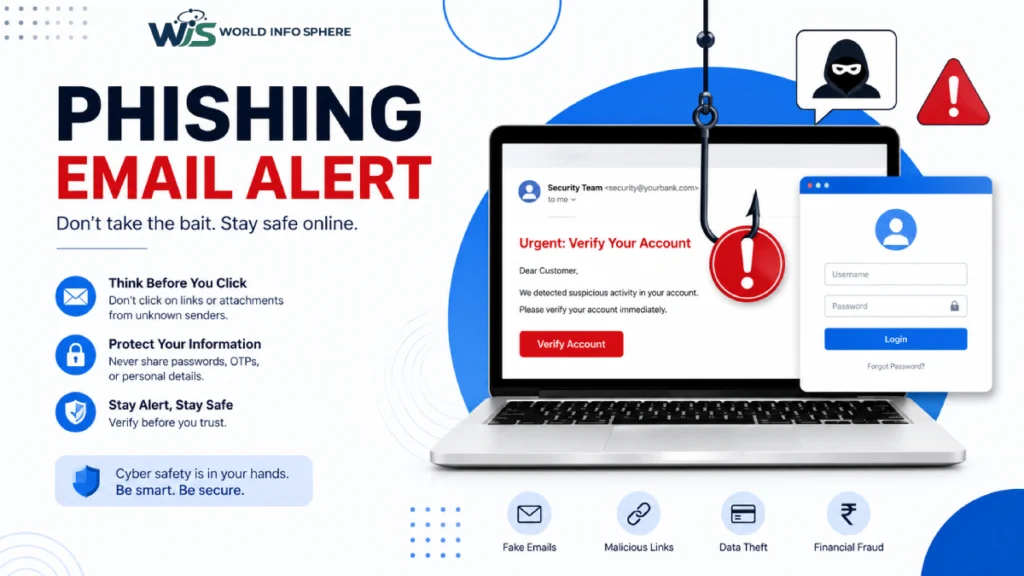
Warning Signs of Phishing Emails
Here are the biggest red flags you should never ignore.
| Warning Sign | Example |
| Urgent language | “Verify immediately” |
| Suspicious links | Strange website URLs |
| Unknown attachments | ZIP or EXE files |
| Grammar mistakes | Awkward sentences |
| Generic greetings | “Dear User” |
| Fake sender domains | Similar but incorrect domains |
| Requests for passwords | Legit companies rarely ask this |
| Unrealistic rewards | “You won ₹5 lakh” |
How to Identify a Phishing Email
Check the Sender’s Email Address
Hackers use similar-looking domains.
Example:
- Real: support@paypal.com
- Fake: support@paypa1.com
Small differences matter.
Hover Over Links Before Clicking
- Always inspect links carefully.
- If the destination looks suspicious, avoid clicking.
Look for HTTPS Carefully
- Even fake websites may use HTTPS now.
- So HTTPS alone does not guarantee safety.
Verify Through Official Sources
Instead of clicking email links:
- Open official apps directly
- Visit websites manually
- Call customer support
Avoid Downloading Unknown Attachments
Dangerous files may contain:
- Malware
- Spyware
- Ransomware
Especially avoid:
- .exe
- .zip
- .docm
Difference Between Spam and Phishing Emails
| Feature | Spam Email | Phishing Email |
| Purpose | Advertising | Stealing information |
| Danger Level | Usually low | Very high |
| Contains Malware | Rarely | Often |
| Requests Sensitive Info | Usually no | Yes |
| Emotional Manipulation | Minimal | Heavy |
All phishing emails are spam, but not all spam emails are phishing attacks.
What Happens If You Click a Phishing Link?
The damage can be serious.
Possible consequences:
- Bank fraud
- Social media hacking
- Identity theft
- Ransomware infection
- Company data leaks
- Financial loss
In business environments, one phishing email can compromise an entire network.
How to Protect Yourself from Phishing Emails
1. Enable Two-Factor Authentication (2FA)
Even if passwords are stolen, 2FA adds extra protection.
Use:
- Authenticator apps
- Security keys
- OTP verification
2. Use Strong Passwords
Avoid weak passwords like:
- 123456
- password
- birthdates
Use:
- Long passwords
- Mixed characters
- Password managers
Long passwords require significantly more time and effort for hackers to crack, making them much harder to break. For more security tips, read our guide on Free VPN Safe Browsing.
3. Keep Devices Updated
Software updates fix security vulnerabilities.
Never ignore:
- System updates
- Browser updates
- Antivirus updates
4. Install Reliable Antivirus Software
Good antivirus tools can detect:
- Malicious links
- Dangerous attachments
- Fake websites
5. Think Before Clicking
This single habit can prevent most attacks.
Ask yourself:
- Was I expecting this email?
- Does the message feel urgent unnecessarily?
- Is the sender trustworthy?
Best Practices for Companies
Businesses are major phishing targets.
Companies should:
- Conduct employee training
- Use email filtering systems
- Enable multi-factor authentication
- Simulate phishing tests
- Restrict sensitive access
Human awareness is critical.
Expert Tips to Stay Safe Online
Expert Tip:
- Never trust urgency in emails blindly.
- Use separate passwords for every account.
- Avoid clicking links directly from emails.
- Use password managers for safer login storage.
- Check domain spelling carefully.
- Cybercriminals rely on tiny visual tricks.
Common Phishing Mistakes People Make
Clicking Too Fast: People react emotionally instead of logically.
Ignoring URL Differences: Tiny domain changes are easy to miss.
Using Same Password Everywhere: One hacked account can compromise everything.
Trusting Social Media Ads Blindly: Some phishing attacks begin through fake ads.
Sharing OTPs: Legitimate companies never ask for OTPs through email.
Pros and Cons of Email Communication Security
| Pros | Cons |
| Fast communication | Vulnerable to phishing |
| Easy file sharing | Malware risks |
| Business efficiency | Identity theft danger |
| Convenient access | Fake email impersonation |
How Phishing Is Evolving
Phishing attacks are becoming smarter because of:
- AI-generated emails
- Deepfake voice scams
- Personalized targeting
- Automated phishing kits
Cybercriminals now use artificial intelligence to:
- Write realistic messages
- Mimic communication styles
- Create believable fake websites
This makes awareness more important than ever.
People Also Ask (PAA)
What is the meaning of phishing email?
A phishing email is a fake message designed to trick users into sharing sensitive information like passwords, OTPs, or banking details.
How can I identify phishing emails?
You can identify phishing emails by checking:
- Suspicious sender addresses
- Urgent language
- Fake links
- Unknown attachments
- Grammar mistakes
Are phishing emails dangerous?
Yes. Phishing emails can steal money, passwords, personal information, and even infect devices with malware.
What should I do after clicking a phishing link?
Immediately:
- Change passwords
- Enable 2FA
- Scan device for malware
- Contact your bank if needed
- Monitor accounts carefully
Can phishing emails hack your phone?
Yes. Malicious links or apps can compromise smartphones and steal personal data.
Also read this:
How to Stay Safe Online in 2026 (Most People Ignore These Risks)
How to Protect Your Phone from Hackers (Complete Guide).
Final Thoughts
Phishing emails are successful because they attack human emotions rather than computer systems.
Hackers know people:
- Panic quickly
- Trust familiar brands
- Click without thinking
- Ignore small warning signs
One careless click can lead to:
- Financial loss
- Account hacking
- Identity theft
- Data breaches
But the good news is this:
Most phishing attacks can be prevented with awareness.
If you:
- Verify emails carefully
- Avoid suspicious links
- Use strong passwords
- Enable 2FA
- Stay alert online
You dramatically reduce your risk.
Cybersecurity is no longer only for IT professionals.
Today, every internet user needs basic phishing awareness.
Because sometimes, the most dangerous hacker attack starts with a simple email.
External Authority Resources
To learn more about phishing protection and online cybersecurity safety, you can also visit these trusted resources:
- Google Safety Center — Official online safety tips, phishing protection guides, and account security resources.
- Microsoft Security Blog — Latest cybersecurity news, phishing attack updates, and security awareness articles.
- CISA Cybersecurity Tips — Government-backed cybersecurity best practices and phishing prevention recommendations.
FAQs
Are phishing emails illegal?
Yes. Phishing is a cybercrime in most countries.
Why do hackers use phishing attacks?
Because phishing is cheap, scalable, and highly profitable.
Can antivirus stop phishing completely?
No. Antivirus helps, but user awareness is still essential.
Who is most targeted by phishing?
Everyone can be targeted:
1. Students
2. Employees
3. Businesses
4. Senior citizens
5. Online shoppers
Do phishing emails only come through Gmail?
No. Phishing can target any email platform.
CTA
Have you ever received a suspicious phishing email?
Share your experience and help others stay safe. Also, forward this guide to your friends, employees, and family members so they can protect themselves from online scams too.